
Homebrew 是 macOS(及 Linux)上最常用的包管理器,一键安装命令行工具与 GUI 软件、自动处理依赖、轻松更新卸载。
一、安装前准备
- 系统:macOS 10.11+
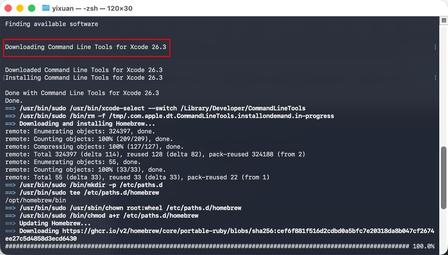
- 先安装命令行工具(终端执行):
bash运行
xcode-select --install
弹出窗口点 “安装”,完成后再继续。
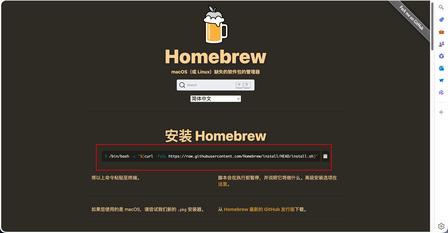
二、一键安装(推荐国内镜像)
方式 1:中科大镜像(国内最快)
bash运行
/bin/zsh -c "$(curl -fsSL https://gitee.com/cunkai/HomebrewCN/raw/master/Homebrew.sh)"
方式 2:官方脚本(可能慢 / 需代理)
bash运行
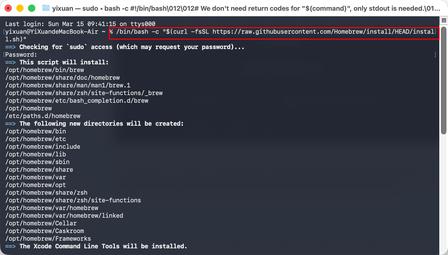
/bin/bash -c "$(curl -fsSL https://raw.githubusercontent.com/Homebrew/install/HEAD/install.sh)"
- 过程中输入开机密码(输入不显示,正常)
- 等待自动下载、配置完成
三、安装后验证 & 环境配置
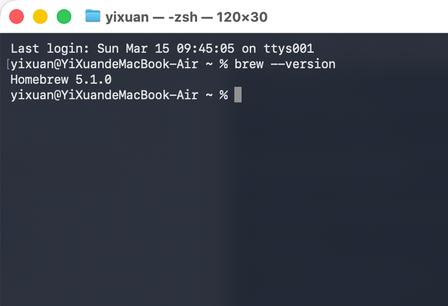
1. 验证
bash运行
brew -v
# 或
brew --version
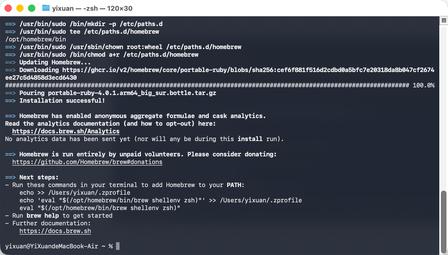
出现版本号即成功。
2. 若提示 command not found(Apple Silicon)
bash运行
# 写入环境变量
echo 'eval "$(/opt/homebrew/bin/brew shellenv)"' >> ~/.zshrc
# 生效
source ~/.zshrc
Intel 芯片路径为 /usr/local。
四、核心命令(必记)
1. 搜索软件
bash运行
brew search 关键词
# 例:搜索 wget、chrome
brew search wget
brew search chrome
2. 安装
- 命令行工具(git/wget/python)
bash运行
brew install 软件名
brew install wget git
- GUI 应用(Chrome/VSCode)
bash运行
brew install --cask 软件名
brew install --cask visual-studio-code google-chrome
3. 更新 & 升级
bash运行
# 更新 Homebrew 自身与软件源
brew update
# 升级所有已装软件
brew upgrade
# 升级单个
brew upgrade wget
4. 查看 & 卸载
bash运行
# 已安装列表
brew list
brew list --cask
# 卸载
brew uninstall wget
brew uninstall --cask chrome
5. 清理与检查
bash运行
# 清理旧版本
brew cleanup
# 检查问题
brew doctor
五、国内镜像加速(必设)
bash运行
# 替换为中科大源
git -C "$(brew --repo)" remote set-url origin https://mirrors.ustc.edu.cn/brew.git
git -C "$(brew --repo homebrew/core)" remote set-url origin https://mirrors.ustc.edu.cn/homebrew-core.git
git -C "$(brew --repo homebrew/cask)" remote set-url origin https://mirrors.ustc.edu.cn/homebrew-cask.git
# 生效
brew update
六、常见问题
- 安装慢 / 失败:换国内镜像
- 权限错误:运行
brew doctor按提示修复 - 找不到软件:先
brew update,再搜索 - 命令失效:重新配置环境变量(第三步)
这份是macOS 最常用软件的 Homebrew 一键安装清单,直接复制终端执行即可。我按类别分好了,方便你按需安装。
一、必备基础工具
bash运行
# 下载工具
brew install wget curl
# 压缩解压
brew install p7zip unrar
# 网络/查询
brew install nmap telnet netcat
# 文本/查看
brew install tree jq bat
二、开发必备(程序员必装)
bash运行
# 版本控制
brew install git
# 运行环境
brew install node python3 php go
# 数据库
brew install mysql redis mongodb
# 服务/环境
brew install nginx apache
brew install docker docker-compose
三、常用浏览器 & 软件(Cask 图形界面)
bash运行
# 浏览器
brew install --cask google-chrome firefox
# 编辑器 & IDE
brew install --cask visual-studio-code
brew install --cask sublime-text
brew install --cask intellij-idea-ce
# 终端工具
brew install --cask iterm2
# 下载工具
brew install --cask qbittorrent
# 播放器
brew install --cask iina
# 聊天办公
brew install --cask telegram discord
brew install --cask microsoft-edge
四、实用工具(效率类)
bash运行
# 解压/截图/录屏
brew install --cask keka
# 窗口管理
brew install --cask rectangle
# 剪贴板增强
brew install --cask maccy
# 清理/维护
brew install --cask omnidisksweeper
五、影音 & 娱乐
bash运行
brew install --cask vlc
brew install --cask spotify
六、Homebrew 常用维护命令
bash运行
# 更新 brew 源
brew update
# 升级所有软件
brew upgrade
# 查看已安装
brew list
brew list --cask
# 清理旧版本缓存
brew cleanup
# 检查问题
brew doctor

评论留言